

The Mercurio Platform: Your Ally for Immigration Procedures in Spain
Are you a foreigner who needs to apply for a residence or work permit in Spain? We’ll explain how the Mercurio platform works, how to access it, which procedures it allows, and why it’s your best ally to avoid long lines and speed up your application.
What is the Mercurio Platform?
The Mercurio platform is the official online system that allows immigration applications (extranjería) to be submitted electronically, without the need to physically visit the immigration office. In other words, it’s a section of the Spanish government’s electronic headquarters where foreign nationals can submit applications for residence authorizations or renewals online . It also allows you to submit additional documents to immigration cases that are already in progress (whether initiated online or in person) . This makes Mercurio a key tool for streamlining and simplifying many immigration procedures.
Mercurio was created to reduce queues and improve case management. Through this platform, your applications go directly to the Immigration Office of your province without delay. Since its launch, the system has continued evolving to accommodate regulatory changes. For example, in May 2025, Mercurio was briefly taken offline to implement updates reflecting the new Immigration Regulations approved in November 2024 . These new regulations introduce significant reforms (such as reducing the time required to apply for arraigo from 3 to 2 years, and creating new categories like the second chance arraigo) , and Mercurio has been updated to allow these new applications without delay. In short, Mercurio is the most direct and widely used online method for handling residence, stay, and work permits in Spain—offering speed, accessibility, and convenience for foreigners living in the country.
How do you access Mercurio?
To use Mercurio, you must authenticate your identity electronically. In practice, this means you’ll need a recognized digital certificate installed on your computer, or use an electronic ID document (like the Spanish DNIe for Spanish nationals) . Authentication is handled through the Cl@ve platform, which unifies access to public digital services. However, you’ll need a personal digital certificate to electronically sign your Mercurio application . In some cases, Mercurio also accepts Cl@ve credentials (such as Cl@ve Permanente or Cl@ve PIN) linked to your NIE, provided you activate the Cl@ve Firma function. Still, the most common and reliable method is to use a digital certificate issued by the Fábrica Nacional de Moneda y Timbre or another certified authority.
Before you access the platform, make sure you have a computer with internet access (Mercurio is not optimized for mobile devices) and have installed Autofirma, the Spanish government’s official electronic signature software, which is required to sign forms. Also, use a compatible browser. (Mercurio used to work best with Internet Explorer and Java , but it has since been updated to support more modern browsers.)
Steps to access Mercurio: Visit the Mercurio – Extranjería Authorizations section of the Spanish e-Government site (link in the official source). Then, select the province where you will be applying. The system will display three login options based on your profile:
-
“Continue as Individual” – designed for foreign nationals applying on their own behalf.
-
“Continue as Gestoría” – for certified administrative managers acting on behalf of clients.
-
“Continue as Labor Advisor” – for registered labor advisors (graduados sociales).
(In the future, other access options may be added for attorneys or other legal representatives. Currently, Mercurio already allows access for lawyers, administrative managers, and labor advisors as long as they are registered with their professional associations) .
In most cases, foreigners applying for themselves should choose “Continue as Individual”. You’ll then be redirected to the Cl@ve login system, where you select your digital certificate and confirm your identity. After logging in, you’ll be able to create a new application or check an existing one. Fill out the online form, upload the required documents in PDF format (passport, proof of residence, contracts, etc., depending on the procedure), and digitally sign and submit the application .
Once submitted, Mercurio will generate a PDF confirmation receipt with your case number and timestamp . This official receipt serves as proof of submission (especially useful for renewals to show you applied on time). Your file will be processed by the appropriate Immigration Office, and you can track its status using your digital certificate through the government site’s “How is my application going?” tool.
Tip: During submission, you’ll be prompted to pay the associated fees (form 790 code 052, etc.). It’s highly recommended to pay these fees online during the process, or at least attach proof of payment. Mercurio allows direct access to the tax authority’s payment portal or the option to upload a bank receipt if you paid at a branch . If you fail to attach proof of payment, your application might still be accepted but could be delayed until you submit it separately .
What types of applications can be submitted through Mercurio?
Mercurio supports a wide variety of immigration procedures, from initial applications to renewals and modifications. Nearly all authorizations handled by Spain’s Immigration Offices (under the Government Delegations/Subdelegations) can be submitted through this platform.
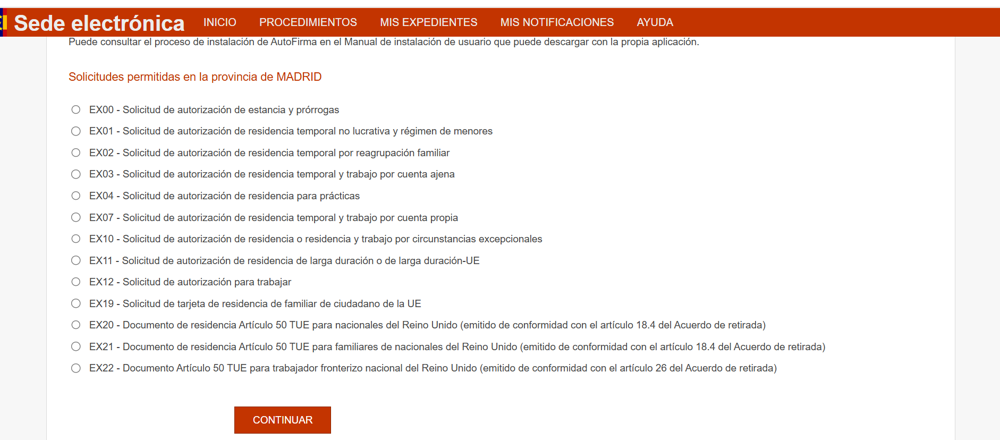
For example, you can submit:
-
Study permits (EX00) – both initial applications and extensions.
-
Non-lucrative residence permits (EX01) – for those who wish to live in Spain without working.
-
Family reunification (EX02) – to bring direct relatives to live with you in Spain.
-
Work and residence permits:
-
As an employee (EX03) – with a job offer from a Spanish employer.
-
As self-employed (EX07) – for freelancers or entrepreneurs.
-
-
Internship residence permits (EX04) – for professional internships after graduation.
-
Residency under exceptional circumstances (EX10) – including arraigo social, laboral, familiar, for training, and the new second chance arraigo introduced in 2024 .
-
Work authorization for students (EX12) – for part-time jobs or internships while studying.
-
Residence card for EU family members (EX19) – for non-EU relatives of EU or Spanish citizens.
-
Long-term or EU long-term residence (EX11) – after 5 years of legal residency.
Mercurio also allows you to handle renewals and modifications, such as:
-
Renewing your work/residence permit (employee, self-employed, non-lucrative, family, etc.).
-
Extending your study stay or your family members’ stay as students.
-
Modifying from one type of permit to another (e.g., from arraigo to regular work residence) .
Nearly all standard immigration procedures are now integrated into Mercurio in one way or another.
Who can submit applications: the applicant or a representative?
A common question is whether you need a lawyer, legal representative, or other third party to use Mercurio—or whether you can do it yourself.
-
In most cases, foreign nationals can submit their own applications via Mercurio. The "Continue as Individual" option is designed for this purpose . This includes most renewals, arraigo, long-term residency, and EU family cards. You do not need a lawyer to use Mercurio in these cases (although it may still be helpful).
-
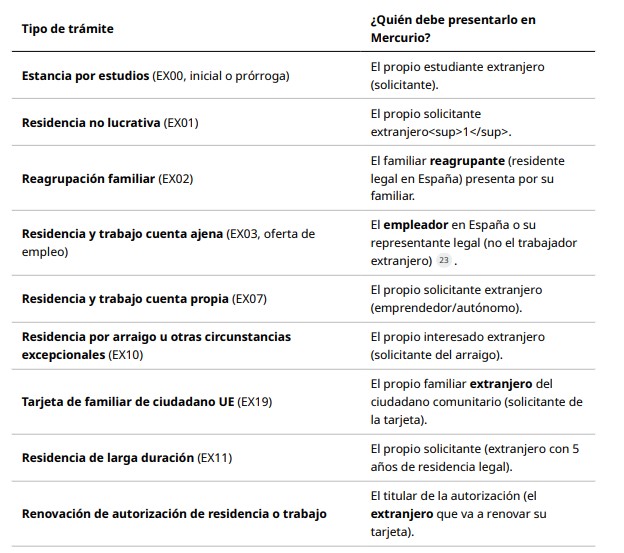
However, some initial applications must be submitted by a third party. For example:
-
Work residence permits (EX03) must be submitted by the employer .
-
Family reunification (EX02) must be submitted by the reunifying relative living in Spain.
In such cases, the foreign beneficiary cannot apply directly.
-
-
Authorized representatives: If you don’t have a digital certificate or prefer not to handle the process yourself, a lawyer, gestor, or professional representative can submit on your behalf via Mercurio . These professionals have their own login portals and must be duly registered and authorized.
Here is a summary table:
Benefits of Using the Mercurio Platform
-
No need for appointments or queues – Apply 24/7 from home.
-
Faster processing times – Electronic files are often handled more quickly.
-
Instant registration and PDF receipt – Proving timely submission.
-
Step-by-step guidance – Reducing form errors.
-
Electronic notifications – Receive resolutions or requests for additional documents instantly.
-
Maintain legal status during renewal – Even after your card expires, as long as you apply on time.
-
Online submission of additional documents – Through the Aportación Telemática system.
-
Online fee payment – Fast and secure.
-
Secure and paperless – Your submission is digitally sealed and traceable.
Limitations and Considerations
-
You need a digital certificate or Cl@ve – This can be a barrier for new arrivals.
-
Technical challenges – Installation issues with Autofirma, browser compatibility, etc.
-
Not all procedures can be done by the foreign applicant – Some require third-party submission.
-
Some steps are still in-person – Like fingerprint appointments for the TIE card.
-
Platform may be down for maintenance – Avoid last-minute submissions.
-
Language and complexity – All forms are in Spanish; legal knowledge is assumed.
In conclusion, the Mercurio platform is a powerful ally for foreigners navigating immigration procedures in Spain. With proper preparation and documentation, you can take advantage of its speed and convenience—and avoid many of the headaches of the traditional in-person process.
If you have further questions or would like personalized guidance, don’t hesitate to contact Visal Immigration Lawyers at +34 618 702 253 or visit our website at www.visalimmigration.com. We are here to help you make immigration in Spain as smooth as possible.

2026 © Visal Immigration - Diseño Web:: Internacionalweb